Notion DESIGN.md for AI coding agents

Notion brings docs, wikis, project planning, and team knowledge into one connected AI workspace with flexible pages, databases, search, and automation.
Design System Overview
Notion brings docs, wikis, project planning, and team knowledge into one connected AI workspace with flexible pages, databases, search, and automation.
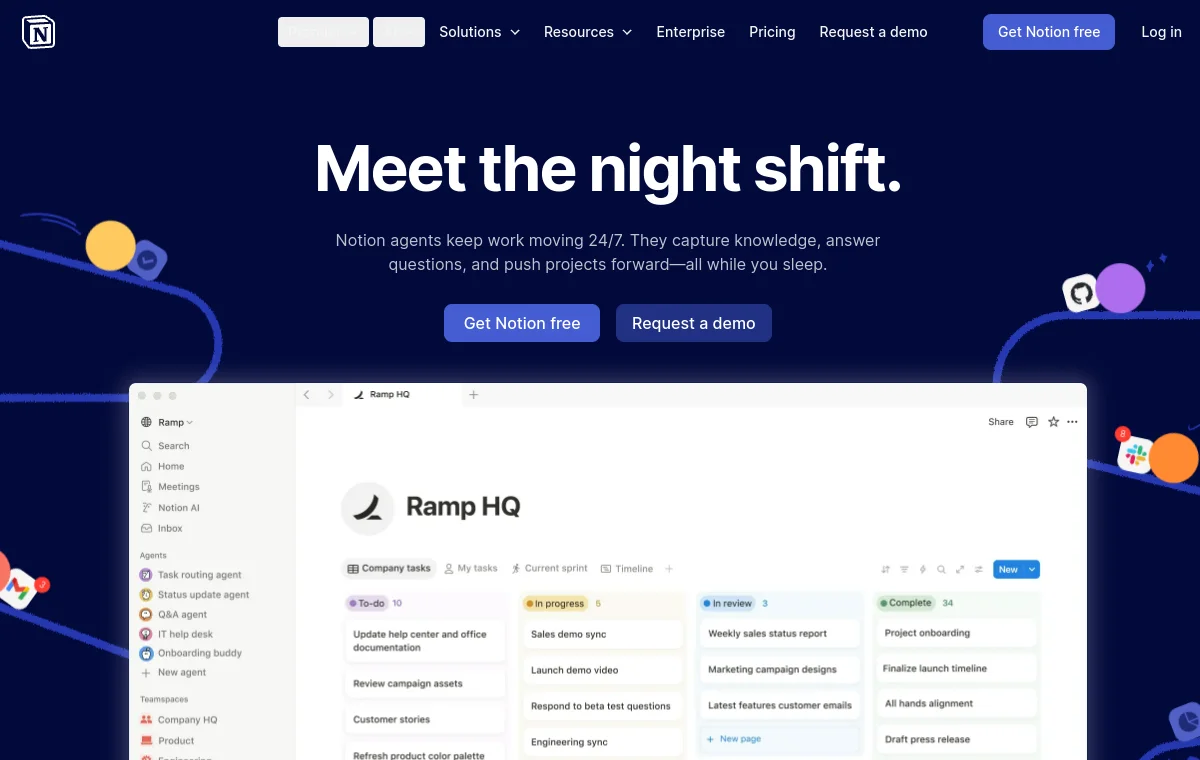
Notion’s current marketing site balances a broad product story with unusually calm hierarchy. Oversized editorial headlines establish the message, warm neutral surfaces keep dense product information approachable, and screenshots provide proof without competing with the narrative.
Editorial hierarchy
Large, tightly spaced headlines lead each section while compact supporting copy keeps complex workflows easy to scan.
Warm neutral foundation
Off-white surfaces, near-black text, and restrained blue accents create a softer alternative to generic enterprise SaaS styling.
Product proof in context
Illustration, interface screenshots, and use-case sections work together so the product feels capable without becoming visually dense.
What to study
- How the navigation groups AI, product, solutions, resources, and enterprise paths.
- How headline scale and whitespace simplify a product with many overlapping use cases.
- How playful illustration is balanced with real interface screenshots and practical calls to action.
Browse more design and creative tools design systems or explore the full DESIGN.md directory.
Color System
Brand palette extracted from the design system. Click any swatch to copy the hex value.
Text / Primary
#455dd3
Accent
#0075de
Surface / Background
#213183
Border / Subtle
#000000
Color Tokens
Typography Specimen
NotionInter
Display
2.8rem / 700 / 1.04
The quick brown fox
Heading H1
2rem / 700 / 1.1
The quick brown fox jumps
Heading H2
1.5rem / 600 / 1.15
The quick brown fox jumps over
Heading H3
1.125rem / 600 / 1.2
The quick brown fox jumps over the lazy
Body
1rem / 400 / 1.5
The quick brown fox jumps over the lazy dog
Small / Caption
0.75rem / 400 / 1.5
The quick brown fox jumps over the lazy dog and sat down.
Monospace
const primary = "System";
Layout & Spacing Tokens
Spacing Scale
Border Radius
Elevation & Shadow
Use with AI Coding Agents
Copy one of these prompts into your AI coding agent to apply the Notion design system to your project. The DESIGN.md file in your repo root is the source of truth.
# .cursor/rules (or DESIGN.md)
You are working in a project that uses the Notion design system.

Read the DESIGN.md file in this project root and follow it strictly when generating UI.
Match the brand's exact colors, typography, spacing scale, and border radius.
Do not create generic Tailwind UI — apply the visual language from DESIGN.md.

Key rules:
- Use the defined color palette, not arbitrary hex values
- Apply the correct font family and weight scale
- Follow spacing tokens (4/8/12/16/24/32px scale)
- Match component patterns: buttons, cards, inputs, badges as specified